
Modern organizations rely on texting, and WhatsApp has swiftly become one of the most powerful instruments in that equation. The Business platform facilitates clear, quick, and easy communication, whether you’re handling support requests, delivering WhatsApp promotions, or informing clients about their orders.
But WhatsApp Business Web is a game-changer when your team needs to handle these exchanges more effectively. It allows you to answer more quickly, operate more efficiently, and easily scale customer discussions by bringing all of WhatsApp’s mobile features to the desktop.
We’ll go over WhatsApp Business Web in this article, including how it functions, why it’s useful, and how to use it for everything from customer care, operations, and marketing to retail and ecommerce.
What Is WhatsApp Business Web?
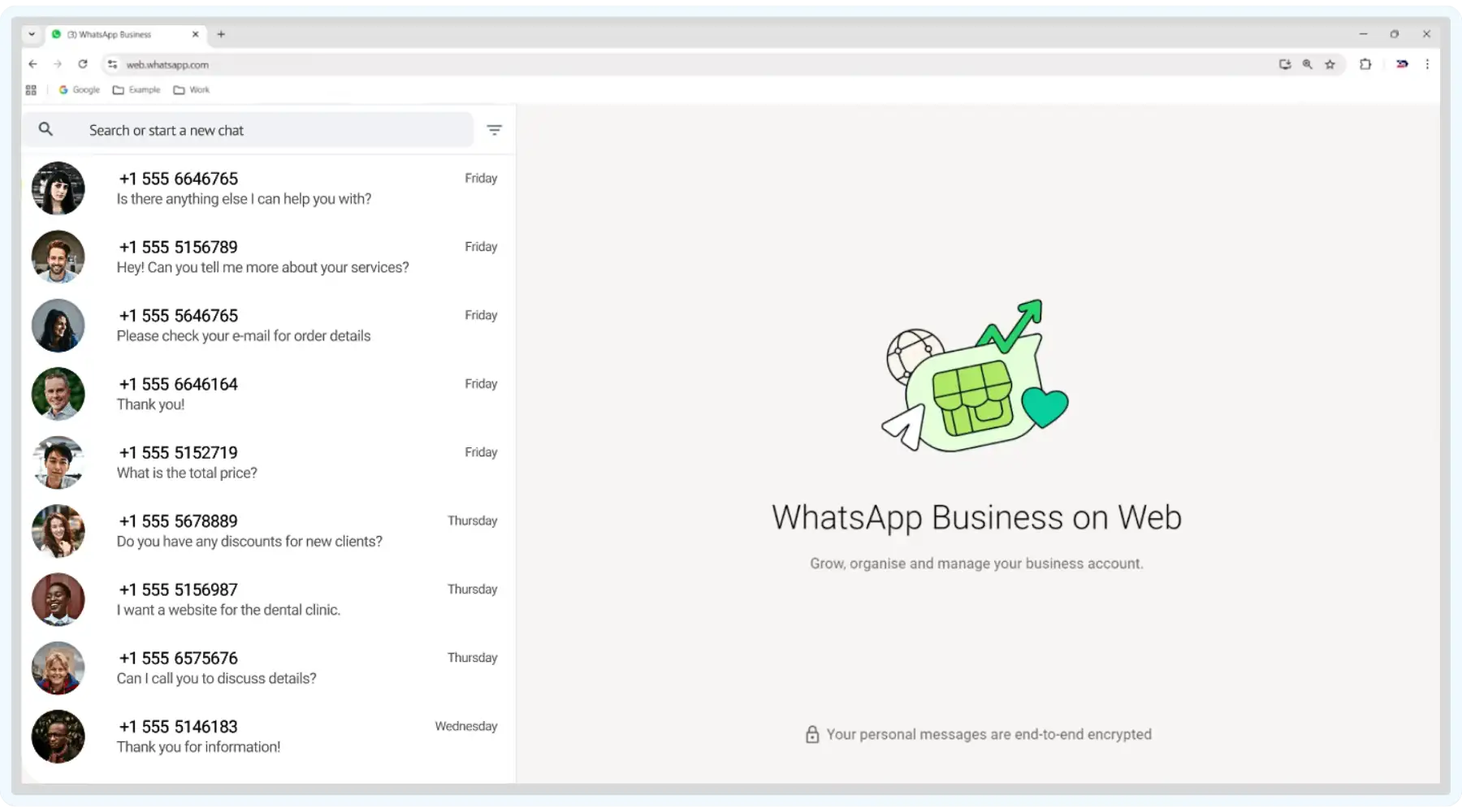
Starting with the definition, let’s outline that WhatsApp Business Web is one of the tools in the portfolio of communication solutions provided by the WhatsApp for Business platform. It allows you to sync your conversations in real time by securely mirroring WhatsApp messages from your mobile devices via a desktop browser. With this capability, you can manage customer communications without switching between your phone and computer.
You can use web.whatsapp.com to access the browser version. While your phone remains responsible for maintaining the connection, the web version enables you to read, send, and respond to messages more comfortably and efficiently.
Using WhatsApp on a larger screen with a full keyboard may greatly simplify everyday business communication, whether you’re delivering messages or responding to consumer questions.
Who Is WhatsApp Business Web Best For?
At first sight, this solution seems to be fitting for everyone, but there are a few determining aspects that might change this impression. If you look for a tool that will serve as a primary communication and promotional channel, depending on your business size, type, and objectives, it might be better for you to opt for alternative versions.
We Recommend WhatsApp Business Web for:
- Freelancers and small businesses
Perfect for easy customer communication and low to moderate message volumes.
- Solo entrepreneurs or small teams
When one or two people oversee chats and prefer to respond from a desktop, this is helpful.
- Basic customer support
Excellent at responding to questions, verifying orders, and giving clear updates.
- Businesses without complex needs
It functions well if you don’t need complex analytics, CRM connectors, or automation.
Who Shouldn’t Use WhatsApp Business Web:
- Growing or large teams
Lacks multi-user management, roles, and scalability features.
- Businesses needing automation or marketing tools
No advanced chatbots, workflows, or detailed campaign analytics.
- Companies requiring system integrations
Doesn’t support built-in CRM, ERP, or helpdesk integrations.
- Regulated industries
Not designed for strict compliance, audit trails, or sensitive data handling.
- Security-sensitive businesses
Limited enterprise-grade security controls for managing confidential information.
WhatsApp Business vs WhatsApp Business Web
While researching the topic, you can also find operators and marketers referring to this tool as just “WhatsApp Business.” Still, it’s different from the Web version that we explore in this article. To avoid any confusion in terms, let’s look at the difference between the two solutions.
- WhatsApp Business App is a mobile-first solution designed to help companies connect with their customers on the go. It lets you build a professional business profile, automate responses, stay organized with chat labels, and more — all in your mobile app.
- WhatsApp Business Web version extends the capabilities of the mobile application. By bringing your account to a larger screen, managing conversations becomes faster and more efficient. With full keyboard access, streamlined file sharing, and easy visibility into contacts and message history, you gain more flexibility for handling higher message volumes.
WhatsApp Business Web vs WhatsApp Desktop
Apart from the mobile app, there’s also a desktop version of WhatsApp for Business. Brands often consider whether they should get this solution web-based or as a desktop application for their daily operation. While both options extend the mobile app to a computer, they have slight differences that we’re going to explore now.
- The main way to access WhatsApp Business Web is through a browser, and it doesn’t require installation. This characteristic makes the web version a flexible option for teams that work across multiple devices or shared computers. However, since it operates as a browser-based tool, its capabilities for integration and some more advanced desktop features might be limited.
- WhatsApp Business Desktop is basically a standalone application that you need to install on your computer. It’s specifically optimized for desktop usage, which makes it smoother and more responsive. With features like native desktop notifications, enabled keyboard shortcuts, and integrations with some other desktop tools, it’s perfect for companies with a high volume of messages that rely on WhatsApp as their main communication channel.
Summing up our comparison, let’s look at the similarities and differences of all three versions.
| Feature | WhatsApp Business Web | WhatsApp Business App | WhatsApp Business Desktop |
|---|---|---|---|
| Primary Use | Browser-based access on desktop | Mobile-first business communication | Dedicated desktop messaging |
| Installlation | Not required | Required | Required |
| Access Method | Web browser | Smartphone | Installed app |
| Device Dependency | Requires phone connection | Independently works on phone | Requires phone connection |
| Typing Experience | Full desktop keyboard | On-screen mobile keyboard | Full desktop keyboard |
| Performance and Stability | Depends on browser | Optimized for mobile | Optimized for desktop |
| Integrations | Limited | Limited | Better integrations with desktop tools |
| Best For | Quick desktop access without installs | Managing business on the go | High-volume customer communication |
Takeaway:
Overall, the WhatsApp Business App is essential for setup and automation, WhatsApp Business web offers fast and flexible browser access, and WhatsApp Business Desktop provides more efficiency to the teams managing conversations and promotions at scale.
WhatsApp Business Web is the best option for single operators and small enterprises who desire a straightforward, cost-free method of chatting with clients from a desktop.
To large teams, companies requiring deep analytics, automated processes, organized workflows, or enterprise-level security and compliance, we recommend looking for more reliable communication or customer support technologies.
Core Features of Web WhatsApp Business
With a larger screen and a complete keyboard, WhatsApp Business Web offers you most of the essential features of the mobile software. It improves the effectiveness of regular customer communication, particularly when balancing talks with customers throughout the day.
Message Mirroring and Real-Time Sync
Web WhatsApp Business mirrors conversations from the mobile app in real time. This allows brands to ensure that all the messages, media, and chat history stay consistent across devices. With the possibilities of delays or missed messages in communication with clients being excluded, your team can move seamlessly between desktop tasks and customer conversations.
Full Chat and Message History
Users can view complete conversation threads, including past messages and shared media, directly from their desktop. Your marketing and support teams can quickly review prior interactions, promotions, or customer questions to personalize responses and maintain message continuity.
Chat Search and Message Filtering
WhatsApp Business Web enables users to search chats by keywords or contact names. You can quickly locate specific parts in past conversations, campaign mentions, or any customer questions without having to scroll through a long chat history.
Starred Messages
Another useful feature is the ability to mark important messages for quick access later. Marketers, for example, often use this functionality to save high-intent leads, pricing discussions, customer feedback, or any other parts of a conversation that need follow-ups or reporting.
Quick Replies (Set up via App)
While this feature requires configuration through the mobile app, after creating quick replies there, you can use them directly in the web interface too. They are very useful for faster responses to common questions and make it easier to maintain consistent brand messaging.
Chat Archiving and Muting
Chats can be archived or muted directly in WhatsApp Business Web. With the use of this feature, you can keep your inbox focused on active leads only while temporarily silencing inactive or completed conversations.
Read Receipts and Message Status Indicators
Just like on the mobile app, the web version shows “Sent”, “Delivered”, and “Read” indicators for messages. This allows you not only see the message status but also to follow up on time and gauge customer engagement with promotions or outreach.
End-to-End Encryption
All messages sent via WhatsApp Business Web have protection from end-to-end encryption, the same as the mobile app. It ensures the safety and privacy of conversations for both businesses and clients, reassuring them that sensitive information, orders, and documents remain secure.
Linked Device Support
WhatsApp Business Web does not function as a separate tool but as a linked device instead, connected to the main account. It facilitates the work from desktop environments while keeping account ownership and security strictly centralized.
Benefits of Using WhatsApp for Business Web
Using WhatsApp Business Web speeds up and improves everyday communication. The desktop interface makes it simple to multitask, share files quickly, and type comfortably. Companies are able to handle several chats at once, categorize interactions using labels, and react to clients faster.
- Browser-Based Access
We already mentioned that with this solution, you can easily open your WhatsApp Business account through a familiar web browser. It requires no software installation and makes it easy for your team to access the platform from office, home, or shared computers without IT support or setup delays.
- Capabilities of Desktop Messaging
For many people, being able to use a complete desktop keyboard to send and receive messages is a big advantage since it’s more convenient. This makes it possible for your team to effectively manage larger communication volumes, particularly during campaigns, product launches, or promotions with tight deadlines.
- Simple Sharing of Files and Media
From their PC, users can upload and send items, including spreadsheets, PDFs, photos, and videos. Catalogs, pricing lists, campaign materials, and promotional images can be shared instantaneously by marketers without first moving files to a mobile device.
- Convenient Management of Contact and Chat
Access to saved contacts, ongoing chats, and recorded discussions is possible through the web interface. This makes it easier for marketers to prioritize high-intent prospects, maintain organization, and swiftly transition between ongoing discussions during hectic times.
- Support of Various Business Tools
Labels and automated messages set up in the mobile app are supported by WhatsApp Business Web. These technologies allow marketers to monitor campaign responses, segment conversations, and make sure that frequently requested questions are consistently answered.
- Support for Browser Notifications
When enabled, the platform can notify users of new messages via the browser. Without continuously monitoring their phones, your support team is able to react in real time to questions and responses.
- Compatibility Across Browsers
Major browsers, including Chrome, Firefox, Safari, Edge, and Opera, are compatible with WhatsApp Business Web. This guarantees that marketing teams, irrespective of browser or operating system preferences, may utilize the product inside their current workflows.
Limitations of WhatsApp Web for Businesses
Despite being an effective boost to the mobile app, WhatsApp Business Web has many drawbacks. There is no integrated CRM, and broadcast messaging features are more limited than on mobile. Let’s take a look at some other limitations of this solution that you need to be wary of.
- Support for No More than 5 Devices
One WhatsApp Business phone number can be connected to a maximum of five devices.
- Doesn’t Provide Advanced Features
Automation, chatbots, CRM connectors, marketing messaging, and message templates are not available.
- Can’t Assure Complete Data Compliance
The free app and its web extensions aren’t designed for team members handling sensitive data or regulated industries.
- No Audit Logs or Message Approval
Message review and history monitoring are not integrated for compliance. For companies with complex internal controls or regulated industries, this may be an issue.
- Restricted Scalability for Expanding Teams
Conversation management using the web interface becomes less effective as message volume rises. Small teams are better suited for WhatsApp Business Web than operations at the corporate level.
How to Set Up WhatsApp Web Business
It is important to note that WhatsApp Business Web does not have a separate download or URL. Just open your WhatsApp Business Client, go to www.web.whatsapp.com, and follow the instructions below to get it.
- Launch the WhatsApp Business web client.
- Tap the three dots after navigating to them.
- After selecting “Linked Devices” and “Link a Device,” scan the QR code on www.web.whatsapp.com.
- Obtain your browser’s WhatsApp Business client.
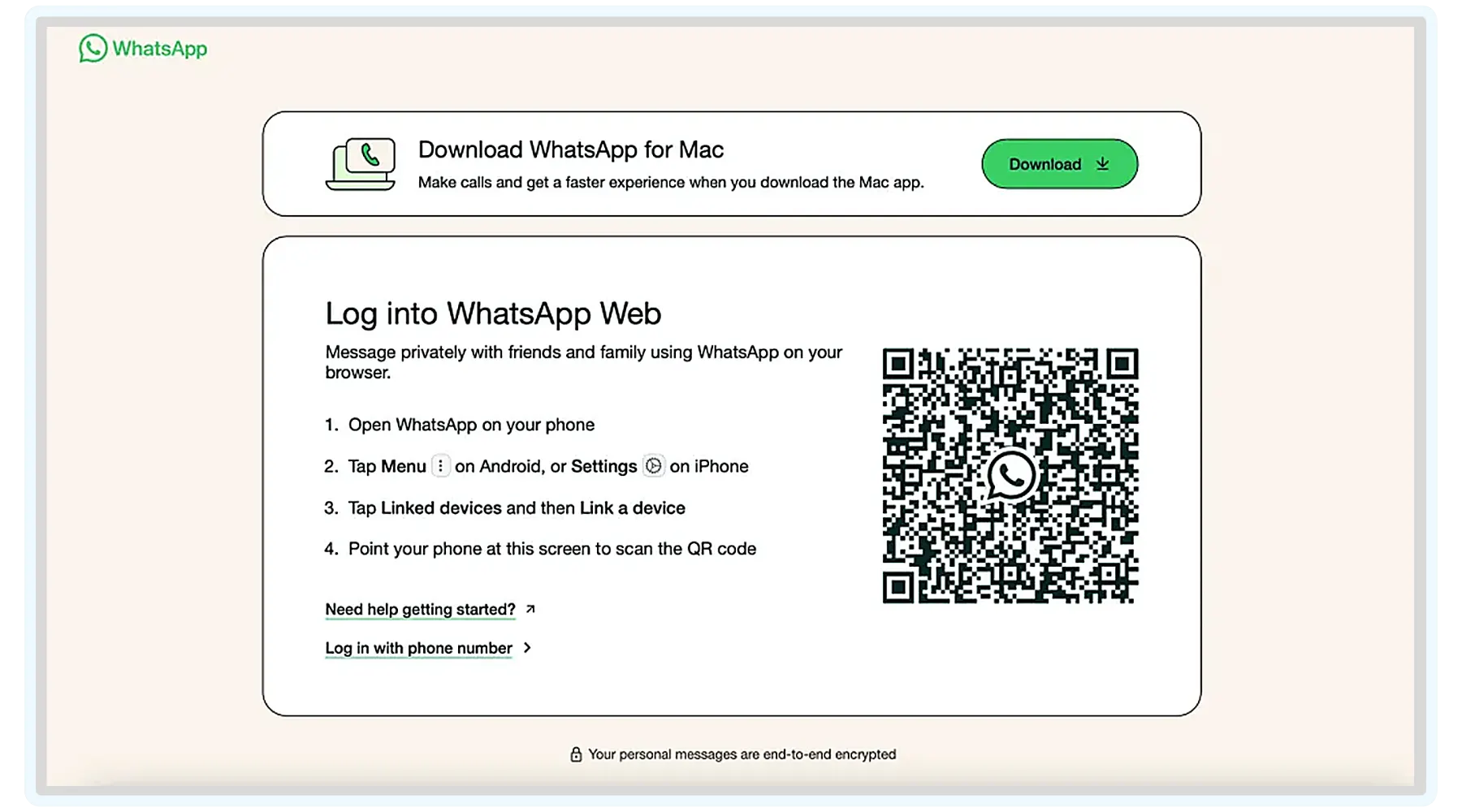
You can now view your messages on your PC and smartphone and use WhatsApp Business Web in your browser as soon as your devices sync. Just bear in mind that you can only open one WhatsApp browser tab at a time.
Would you rather use a specific desktop application? Then, you can use WhatsApp Business Desktop straight on your computer by downloading the application. Although it has a few additional attributes, it is essentially similar to the Web version.
How to Set Up Windows Users
Transferring a mobile WhatsApp account to a desktop one is easy with the native Windows desktop WhatsApp client. To install one on your PC, follow these steps:
- Using a Windows computer, go to the Microsoft Store.
- Look through the recommended apps and select “WhatsApp Desktop.”
- Select “Get” and “Install.”
- Proceed with the installation procedure.
- The next necessary step is to launch WhatsApp’s mobile app on your phone.
- Under “Settings,” locate “WhatsApp Web/Desktop.”
- You must use your phone to scan the QR code when it appears on your desktop screen.
Your account has now been resolved and verified. Use the built-in WhatsApp desktop app to open it. Please be aware that the app can only be used to access one account.
Instruction for Mac Users
The steps mentioned above for Windows PCs are remarkably similar to those for installing the WhatsApp Business App on a Mac. Let’s talk about the necessary steps to move forward:
- Go to the computer’s App Store.
- Locate “WhatApp Desktop.”
- Select “Get” and “Install.”
- Install “WhatsApp Desktop” after downloading it.
- On your phone, click the WhatsApp icon.
- Navigate to the settings and select “WhatsApp Web/Desktop.”
- You must use your phone to scan the QR code when it appears on your desktop screen.
- Your account has now been resolved and verified. Use the built-in WhatsApp app on Mac computers to access it.
How to Use WhatsApp Business Web App
Considering all the characteristics we mentioned, WhatsApp Business Web is a useful desktop add-on for marketing, sales, and customer service departments, facilitating quicker responses, improved multitasking, and more effective communication across the customer journey. Overall, it has many use cases in day-to-day business operations.
Customer Support
Small and expanding teams frequently utilize WhatsApp Business Web to handle client communications directly from their desktop. Without only using a mobile device, it facilitates routine interactions, including answering questions about pricing or availability, managing inquiries, and following up on client requests.
Transactional Messages
WhatsApp Business Web facilitates ecommerce and transactional communication by enabling companies to exchange delivery updates, confirm orders, and provide real-time product-related answers. It facilitates a more connected customer experience and lowers drop-offs during the buying journey when used in conjunction with other message channels.
WhatsApp Marketing
WhatsApp Business Web is also used by marketing and growth teams to assist with campaign execution. From providing rich multimedia content to sharing product announcements and promotional offers, the platform enables marketers to interact with consumers in a more direct and conversational manner, which promotes quicker replies and increased engagement.
Conclusion
Teams that handle client communication daily will find WhatsApp Business Web an efficient alternative to the mobile app. It can help you work more efficiently, maintain organization, and provide a better customer experience by shifting communication to the desktop. If you need professional assistance for setting up your promotional campaigns on WhatsApp and any further consulting on advanced marketing solutions, contact Flowium. We’re well-versed with this platform and all the capabilities it has to offer to ecommerce DTC brands in terms of promotions and communication with clients.
FAQ
- How safe is WhatsApp Business Web?
Similar to WhatsApp’s app, WhatsApp Business Web encrypts conversations. But once you’ve completed your tasks, don’t forget to log off. The account itself could be in danger if the PC is compromised.
- Is WhatsApp Business Web available for free?
Indeed, WhatsApp Business is available for free in both browser and app versions.
- What is the process for WhatsApp Business Web?
Real-time chat mirroring from the mobile app is possible with WhatsApp Business Web. The linked phone, which continues to be the main device, receives messages received from the PC.
- At what point should a company stop using WhatsApp Business Web?
When chat volumes rise, more agents are needed, or WhatsApp becomes a crucial revenue and support channel, businesses should think about using sophisticated WhatsApp CRM or automation systems.